How to Report Cosmetology CE Hours in Florida: 2026 Steps
Finished your Florida cosmetology CE course, but the hours aren’t showing on your license record? If you’re learning how to report cosmetology CE hours Florida, start with one key point: approved providers are required to report course completions electronically to DBPR. You usually don’t submit the hours yourself, but you should check that they appear in your record.
It’s reasonable to want confirmation before renewal. This guide explains where to check your reported credits, what to do if hours are missing or incorrect, and which records to keep as proof of completion.
You’ll learn how to review your CE status through MyFloridaLicense.com, confirm that your course and license details match, and contact your provider if a record needs attention. Keep your certificate even after the hours appear in the state system. If you complete Florida CE through EZceus, you’ll receive an instant digital certificate to keep while you verify your official record separately.
Key Takeaways
- Learn how to report cosmetology CE hours Florida by understanding what your provider reports and what you should verify yourself.
- Find where to check your official CE record and confirm that course credits are matched to your license.
- If hours are missing, follow a troubleshooting sequence before assuming your course or credits are invalid.
- Keep certificates, confirmations, provider messages, and account screenshots together to support your renewal records.
- Explore self-paced, state-approved Florida cosmetology CE from EZceus, and keep your completion certificate while checking your official record separately.
How Florida cosmetology CE reporting works, and who checks your hours
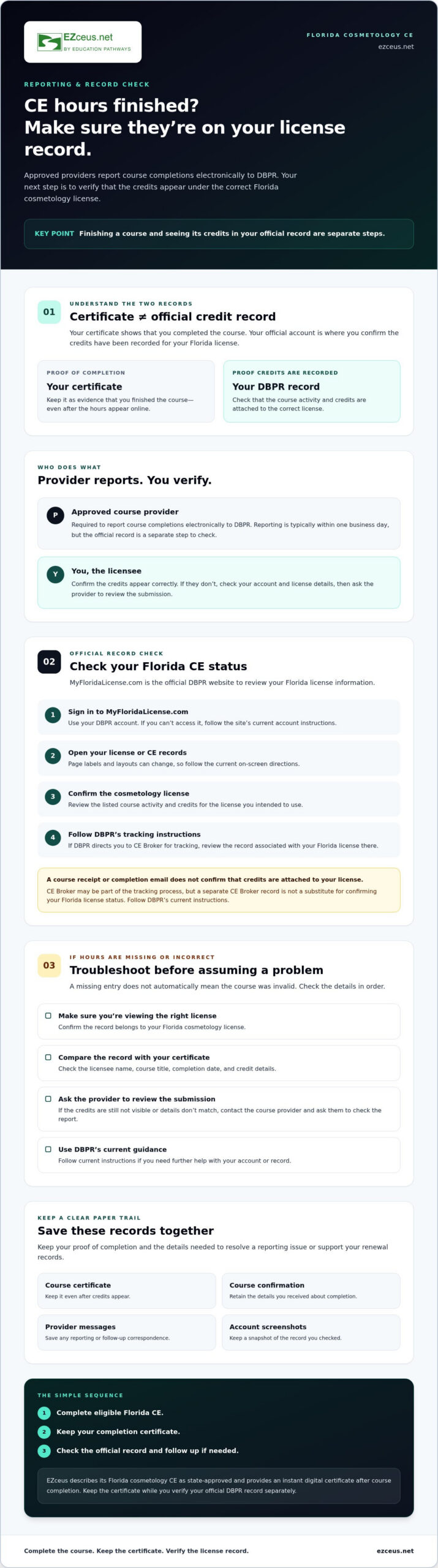
Completing a course and seeing its credits on your license record are separate steps. A completion certificate shows that you finished the course. Your official account is where you confirm that the credits have been recorded for your Florida license.
Florida’s Department of Business and Professional Regulation (DBPR) oversees cosmetology licensing. Approved continuing education providers are required to report course completions electronically to DBPR, typically within one business day. Because the provider’s process and the official record are separate, don’t assume your hours have appeared just because you finished a class or received a receipt. Check the official record and contact the provider if the credits aren’t listed.
Cosmetology covers professional services such as hairstyling, skin care, and nail care, as outlined in Cosmetology. For license-specific requirements and records, use Florida’s official DBPR resources. This guide focuses on CE reporting. Consult a Florida license renewal guide for the broader renewal process.
Does Florida cosmetology CE go through CE Broker?
CE Broker is a continuing education tracking platform, but don’t treat a separate CE Broker record as a substitute for confirming your Florida license status. DBPR’s official licensing website, MyFloridaLicense.com, is the place to check your Florida cosmetology record. Follow DBPR’s current instructions for any tracking portal or account it directs you to use. A course receipt alone doesn’t confirm that credits are attached to your license.
What the cosmetologist and course provider each need to do
The approved provider handles required electronic reporting. You are responsible for checking that the credits appear correctly. If they don’t, confirm the account and license details you used, then ask the provider to review the submission. Keep your certificate while the issue is being resolved, even if the provider has reported the completion.
Course completion proves you finished the learning. Credit verification confirms the official record reflects it.
That’s the practical answer to how to report cosmetology CE hours Florida: complete eligible CE, understand your provider’s reporting process, and verify the official record instead of assuming the task is finished. EZceus describes its Florida cosmetology CE as state-approved and provides an instant digital certificate after course completion. Keep the certificate, then check your DBPR record separately. Don’t assume credits have been reported unless the provider’s process confirms that.
How to check whether your Florida cosmetology CE hours were reported
Check the official record rather than relying on a course receipt or completion email. Florida DBPR’s MyFloridaLicense.com is the official place to review your license information. CE Broker may also be part of the CE tracking process, so follow DBPR’s current instructions to confirm which account or tracking page applies to your license.
Where to look for reported credits
- Go to MyFloridaLicense.com and sign in to your DBPR account. If you can’t access it, follow the site’s current account instructions.
- Open the area for your license or continuing education records. Page labels and layouts can change, so follow the current on-screen directions rather than relying on a particular menu name.
- Confirm that you’re viewing your cosmetology license, then review the listed course activity and credits.
- If DBPR’s instructions direct you to CE Broker for tracking, sign in there and review the record associated with your Florida license.
Florida DBPR’s continuing education requirements FAQ is a useful official reference if you’re unsure which rules apply. If your account shows no course activity, don’t assume the course was invalid. First confirm that you’re viewing the right license record. Then compare the course details with your certificate and contact the provider if the credit still isn’t visible. Follow current DBPR guidance if you need further help.
How to match a course record to your certificate
Compare the account entry with your certificate and course confirmation. Check the licensee name, course title, completion date, and credit details. A spelling difference or incorrect license number can make a completion harder to match to your record, so review those details before raising a reporting issue.
Don’t assume a very recent completion has posted. Check the provider’s reporting process and DBPR’s current instructions, especially as renewal approaches. For the broader deadline and renewal process, consult a Florida cosmetology license renewal guide.
To understand how to report cosmetology CE hours Florida, follow this sequence: check the official record, compare it with your documentation, then follow up on any mismatch. If you still need eligible coursework, review self-paced Florida cosmetology CE from EZceus. Keep your certificate and verify your record separately.
Missing Florida cosmetology CE hours? Follow this troubleshooting process
A course that isn’t showing in your record is a reason to investigate, not proof that it was invalid. Reporting or record-matching issues can happen. Work through these steps in order and keep notes on what you checked so you can explain the discrepancy clearly.
- Recheck your account and license details. Make sure you’re signed in to the correct account and viewing the cosmetology license connected to the course. Compare the name and license information in your account with the details you gave the provider. If you’re unsure where to check, follow the current instructions on the Florida Cosmetology CE Requirements page and the relevant official account.
- Contact the course provider. Ask whether your completion is recorded and whether the provider submitted the required course information. The provider may need to verify your details before investigating a missing or incorrect entry.
- Follow official support instructions. If the provider confirms that reporting was submitted but the record remains missing, use the support channel specified by DBPR or the relevant CE tracking account. Explain what you’ve already checked and follow the instructions for correcting or escalating the record.
Processing expectations can depend on the organization and the issue. Ask the provider or official support team what to expect, especially if your renewal date is approaching. Don’t rely on a guessed posting timeframe.
What to send your CE provider
Have your course certificate, course title, completion date, and license information ready. Ask the provider to confirm your completion status and whether reporting was submitted. Share license details only through the provider’s requested secure process. If the record needs correction, request written confirmation of the next step so you have a clear trail to refer to.
For example, if your certificate shows a completed course but your account has no matching activity, tell the provider when you completed it and which license record you checked. Send documentation only as requested. Avoid sharing sensitive information through an unverified channel.
When to contact CE Broker or Florida DBPR
If the provider can’t resolve the discrepancy, consult DBPR’s current instructions to determine whether to contact DBPR or CE Broker for account support. Include the course name, completion date, license details, and provider response. Provide a copy of your certificate if the official channel requests it. Keep your message factual and save any replies.
Contact the course provider first because it can confirm whether your completion was recorded and whether reporting was submitted. This is the practical next step in how to report cosmetology CE hours Florida when credits don’t appear: check your details, ask the provider, then use official support guidance to pursue a correction.
How to protect your Florida CE records before license renewal
A well-organized CE file makes it easier to resolve a missing credit or confirm a course record before renewal. Keep your own documentation even when a provider is responsible for reporting. Your files can support follow-up, but they don’t replace required reporting or the official record.
A simple CE recordkeeping checklist
Create one digital folder for each renewal cycle. Save each course certificate with the course title, completion date, provider, and license details used during enrollment. Add payment confirmations and messages with the provider. Once credits appear in your tracking account, save a dated screenshot showing the relevant course record.
- Use clear file names, such as the course title and completion date.
- Keep the certificate and provider correspondence in the same folder.
- Store files somewhere you can access when contacting the provider or checking your account.
- Retain records according to current official guidance.
This simple system gives you the information you’ll need if a course entry is delayed, missing, or doesn’t match your certificate. If you’re learning how to report cosmetology CE hours Florida, remember that personal records help you track and troubleshoot credits, but they don’t confirm that the state record has been updated.
Staying organized with state regulations is equally important for entrepreneurs who manage multi-service establishments or branch into food and beverage hospitality; partnering with a Florida restaurant licensing consultant can help streamline required permits and agency compliance.
What to do when renewal is approaching
Check your license status and the current DBPR renewal instructions well before submitting your renewal. Review the official CE record, then compare it with your certificates and course history. For renewal-specific requirements and timing, use a Florida cosmetology license renewal guide and confirm details through DBPR, since deadlines depend on your license cycle.
If a credit still isn’t verified, contact the provider promptly with your course details and certificate. If the provider can’t resolve the issue, follow DBPR or CE Broker’s current support instructions. Keep written replies with your records. An informal assurance may be helpful, but it doesn’t replace checking the official account or retaining written confirmation.
If you need to complete Florida cosmetology CE before renewal, explore EZceus Florida cosmetology CE. EZceus describes its Florida CE as state-approved and provides an instant digital certificate after course completion. Save the certificate, then verify the official record separately.
Choose Florida-approved cosmetology CE and verify completion with EZceus
A reliable CE routine has four steps: confirm the course fits your Florida license and renewal cycle, complete it, save your certificate, and check the official record. A certificate documents course completion. It doesn’t, by itself, prove that credits have been reported or added to your license record.
What to confirm before enrolling in an online CE course
Before you begin, make sure the course is intended for your Florida license type and applies to your current renewal cycle. Check the provider’s reporting instructions, including how it handles course completions and which license details it needs. Keep those instructions with your enrollment confirmation. If you later need to ask about a missing credit, you’ll know what information the provider requested and what reporting process it described.
Don’t assume every provider follows the same process or that a course completion appears in your account immediately. If you have questions about eligibility or reporting, confirm the details with the provider before relying on the course for renewal. Then compare your certificate with the official record, using the steps covered earlier in this guide.
Complete your Florida CE with a clear recordkeeping plan
Self-paced online study can be a practical fit for cosmetologists balancing CE with work and other commitments. EZceus offers self-paced cosmetology and barber CE courses for license renewal in Florida, Texas, Ohio, Iowa, and Nebraska. Its CE classes for Florida, Ohio, and Texas are state-approved. Students receive an instant digital certificate after completing a course.
After you finish, download and save your certificate with the course title, completion date, and license information. Then check your official CE record separately. If the credit doesn’t appear, follow the provider’s reporting instructions and ask the provider to confirm the status. Don’t treat certificate delivery as confirmation of state reporting.
- Confirm course suitability for your Florida license and renewal cycle.
- Review the provider’s reporting process and required license details.
- Save the completion certificate and enrollment records.
- Verify the credit in the official account and follow up on any discrepancy.
That’s the safest way to approach how to report cosmetology CE hours Florida: understand the provider’s process, keep proof, and verify the official record. If self-paced study suits your schedule, explore EZceus Florida cosmetology CE and review the course details and reporting instructions before enrolling.
Make your CE record renewal-ready
The process is manageable: check your official CE record, compare course entries with your certificates, and contact the provider first if a credit is missing. Keep certificates and related messages together, then review your record again before submitting your renewal.
Knowing how to report cosmetology CE hours Florida means understanding the provider’s reporting process and verifying the result yourself. A course certificate is useful proof of completion, but it doesn’t replace confirmation in the official record.
If you still need Florida CE, EZceus offers self-paced cosmetology courses described as state-approved. Students receive an instant digital certificate after completion. Review the course and its reporting instructions, save your certificate, and verify your official record separately.
Explore self-paced Florida cosmetology CE courses, then take the next step with a clear plan. Keeping your records organized can make renewal easier to manage.
Frequently Asked Questions
How do I report cosmetology CE hours to Florida DBPR?
If you complete CE through an approved provider, the provider is responsible for electronically reporting your course completion to DBPR. You generally don’t submit the hours yourself. Sign in to your account at MyFloridaLicense.com to check your official record. If the credits aren’t listed, confirm your course and license details, then contact the provider to ask whether completion was reported. Keep your certificate as supporting documentation.
Does CE Broker automatically report Florida cosmetology CE hours?
CE Broker is used for continuing education tracking, but it isn’t a substitute for confirming who reports your course completion. Florida’s approved providers are responsible for electronically reporting completions to DBPR. Don’t assume a course was reported simply because you finished it or received a certificate. Check the current instructions for your account, then verify that the course appears in the relevant official record.
How can I check whether my Florida cosmetology CE hours were reported?
Sign in to your account through MyFloridaLicense.com and review the record for your cosmetology license and course activity. Follow current DBPR instructions if they direct you to another tracking account. Compare any listed course with your certificate, including the course name and completion date. For how to report cosmetology CE hours Florida, the key is to verify the official record rather than relying only on a receipt or email.
What should I do if my Florida cosmetology hours are missing from CE Broker?
First, confirm you’re viewing the correct account and license record. Then contact the course provider and ask it to verify your completion and whether reporting was submitted. Have your certificate, completion date, course details, and license information ready. If the provider can’t resolve the issue, follow the current support instructions from DBPR or the relevant tracking account. A missing display is a reason to investigate, not proof the course was invalid.
Can I submit my cosmetology CE certificate myself in Florida?
For CE completed with an approved provider, the provider is responsible for electronically reporting course completions to DBPR, so you generally don’t need to self-report. Still, retain your certificate. If credits are missing, ask the provider what it submitted and follow any official instructions you receive. Don’t upload or send a certificate through an unofficial channel, and don’t assume keeping it alone updates your state record.
How long does it take for Florida cosmetology CE hours to appear?
Approved providers typically report course completions electronically within one business day, but delays in the state system can occur. Check your official record after completing the course and allow for the provider’s stated process. If the credit still isn’t showing, contact the provider to confirm whether reporting was submitted and ask about expected processing. Avoid relying on an assumed posting time, especially as your renewal deadline approaches.
Do I need to keep my Florida cosmetology CE certificates after reporting?
Yes. Keep your certificate even after the credits appear in your account. It documents your course completion and gives you useful information if a record is missing, inaccurate, or needs follow-up. Save it with the course title, completion date, provider confirmation, and any messages about reporting. Your certificate supports troubleshooting, but it doesn’t replace the official CE record or any reporting required from the provider.